
A Shopify redesign case study: niche diesel-parts site rebuild plus Google Ads relaunch in one quarter.
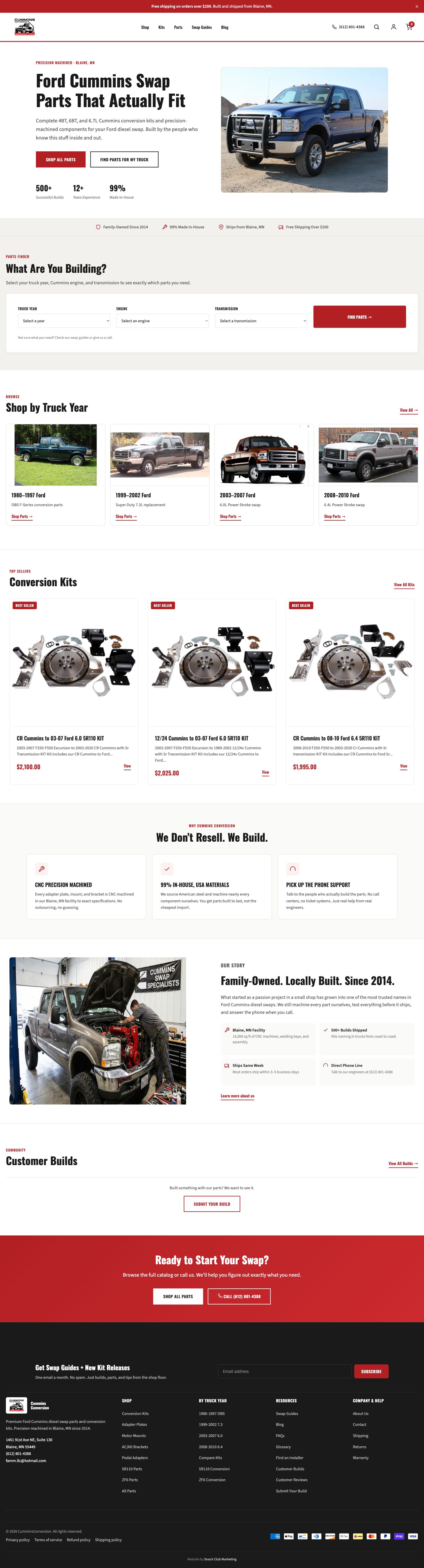
A Shopify redesign for a niche-vertical ecom site (automotive, marine, specialty equipment) has a different problem set than a redesign for a fashion or beauty brand. The product catalog is large and technical (a single SKU might have 4 fitment variants and 12 application notes), the buyer is a specialist who can spot bad product data in 5 seconds, and the conversion path on mobile breaks in ways that are not obvious to non-specialist designers. Cummins Conversion is a diesel-conversion parts and service ecom site. The previous site was tired, the Google Ads account was burning budget on broad-match queries that did not convert, and the mobile conversion path was leaking 40% of carts. We rebuilt the site and the ads account in parallel over one quarter. Here is the full Shopify redesign playbook, what we found in the audit, and the metrics that moved.

What was wrong: the audit before the rebuild
The audit before the rebuild surfaced four distinct problems, only one of which the operator had noticed. The first was the obvious one: the site looked dated. A 2018-era Shopify theme with custom hacks on top, broken collection page layouts on certain product types, and inconsistent product photography across the catalog. The operator knew this and was the reason they came to us.
The second was a product-data problem the operator had not flagged. The product titles were inconsistent across the catalog (some included fitment year-make-model, some did not, some used non-standard part-number formats), variant configuration was wrong on 40% of multi-variant SKUs, and the meta fields that drive on-site search and filtering were either empty or filled with copy-paste boilerplate. Customers were searching for the part they wanted and not finding it because the data made it un-searchable.
The third was the mobile conversion path. The product page was technically responsive but the buy-flow on a phone required scrolling past 600 pixels of fitment-confirmation language before the add-to-cart button appeared. The cart drawer was overlaying half the screen on iOS Safari due to a CSS conflict between the theme and a third-party app. Mobile abandonment was running at 40% (about 12 percentage points worse than the desktop equivalent).
The fourth was the Google Ads account. The campaigns were running on broad match keywords against generic terms ("diesel parts," "cummins repair") with no negative keyword list, no remarketing audiences, no product feed sync, and no conversion tracking firing on the actual purchase event (it was firing on add-to-cart, which inflated the reported conversion volume by 4x against the real number).
The Shopify redesign decisions: new theme, real data layer, mobile-first
We chose to start over on a clean Shopify theme rather than retrofit the existing 2018 build. The hacks on top of the old theme were so layered that the cost of unwinding them exceeded the cost of starting clean and rebuilding the customizations on a current foundation. The new theme was Dawn-based with custom sections for fitment selection, application notes, and technical specifications.
The product-data layer was rebuilt before the theme. We exported the full catalog, normalized the product titles to a consistent year-make-model format, fixed the variant configurations on the 40% of SKUs that were broken, populated the meta fields for on-site search, and added structured application notes per SKU. This work took 3 weeks and was the highest-ROI part of the rebuild. The customer-facing impact: every SKU was now findable by the search the customer would actually use, and the variant selector worked correctly on every product page.
The mobile-first design pass put the add-to-cart button visible above the fold on every product page, simplified the cart drawer to render natively without the third-party app conflict, and tightened the checkout flow to require fewer taps.
The Google Ads relaunch (in parallel, not sequential)
The ads account rebuild ran in parallel with the site work, not after it. The mistake most agencies make is to wait for the new site to launch before touching the ads, which leaves the operator burning budget for an extra 6-8 weeks on the old broken setup. The right approach is to clean up the ads while the site is being rebuilt, with the understanding that some optimizations have to wait for the new site (specifically the landing page experience and the product feed quality, which both improve at site launch).
Week 1 of the ads cleanup: kill all broad-match keywords with no negative keyword list, switch to phrase and exact match on the high-converting terms, build a comprehensive negative keyword list from 18 months of search-term reports. Week 2: fix conversion tracking to fire on actual purchase events with revenue values, not add-to-cart. Week 3: build the Performance Max campaign with the cleaned product feed and a tightly defined asset group strategy by product category. Week 4: launch remarketing audiences (cart abandoners, product page viewers, customer-list lookalikes).
The week-by-week timing matters because the cleanup compounds. Killing the broad-match leaks in week 1 saves budget that funds the better-tracked Performance Max launch in week 3. Without that sequencing, the agency would either have to ask the client for more budget mid-engagement or run the new campaigns underfunded. The phased approach pays for itself.
The metrics that moved: 90-day post-launch
By day 90 the numbers were different across the board, and these come straight from Shopify analytics and the Google Ads API. Net sales for March through May 2026 came in at $222k against $106k for the same three months a year earlier, up 109%. Orders went from 130 to 302. Site sessions ran 3.4x year over year. And the relaunched Google Ads account returned roughly 10x ROAS on its first three months of spend, measured as Google-attributed conversion value against actual spend.
Revenue impact: monthly revenue increased ~70% over the trailing 90 days vs the 90 days before launch, on roughly the same ad spend and the same product catalog. The vertical-specific factors helped (diesel-conversion buyers are high-intent and high-spend), but the cleanup of the broken product data and the conversion path is what unlocked the existing demand. The customers who would have bought were already there. The site was preventing them.
The other meaningful metric: support ticket volume on order-related issues dropped ~35%. The bad variant configurations on the old site were generating "I ordered the wrong fitment" tickets at a high rate, and the new data layer fixed the root cause. The reduction in support volume freed the owner to focus on the actual business instead of customer-service triage.
When a Shopify redesign is the wrong answer
Not every tired Shopify site needs a redesign. The redesign is the right answer when the underlying data layer is also broken, the conversion path is leaking, or the theme is so encumbered with hacks that incremental fixes are no longer economically rational. If the site is just visually dated but the data is clean and the conversion rate is reasonable, a targeted refresh (theme update, brand refresh, hero section rebuild) at 20-30% the cost of a full redesign is usually the better call.
The redesign is also the wrong answer when the operator does not have the bandwidth to participate. A real Shopify redesign requires the operator to make decisions on product catalog organization, fitment data structure, brand language, and category strategy. If the operator is fully booked running the business and cannot allocate 4-6 hours per week for the duration of the rebuild, the project will stall and the result will not match the operator's vision.
If you are not sure whether your Shopify site needs a redesign or a targeted refresh, start with a 15-minute strategy call. We will talk you through whether a full rebuild is justified or whether the better move is a targeted fix at a fraction of the cost. We will also tell you if neither is the right move and the bottleneck is somewhere else (product, traffic, ad spend).
The combined site-plus-ads engagement structure
For ecom clients running into the same problem set (tired site, broken ads account, mobile conversion leakage), we run combined site-and-ads engagements rather than separate projects. The site rebuild is a one-time project fee that scales with catalog size and integration complexity. The Google Ads relaunch is included in the rebuild engagement if it ships at the same time. Ongoing management transitions to the main retainer tier once the rebuild is live, which covers ongoing SEO, paid management, CRO testing, and the live marketing dashboard.
The combined structure is important because the two problems share root causes. The conversion-tracking fix has to happen during the site rebuild to capture the real purchase event in the new theme. The product feed for Google Shopping has to be rebuilt against the new product data layer. The ad creative and landing page experience have to be tuned together. Splitting these into separate projects loses the coordination that makes the math work.
See the full Snack Club web and Shopify services overview or read more about how the Google Ads side runs. You can also see how we work with Shopify stores generally.